Rysel: A Bold Display Font for Vintage-Inspired Branding and Creative Projects
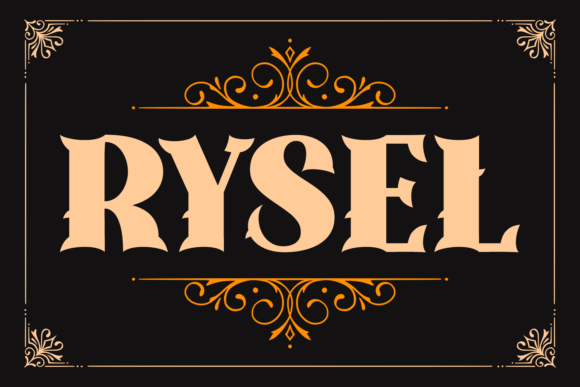
In the world of typography, choosing the right font can make or break a design. Rysel is a highly decorative and bold display font that stands out with its strong character and flared serifs, evoking the rich aesthetic of late 19th-century lettering. Whether you're designing vintage-style posters, branding materials, product labels, or creative content, Rysel offers a timeless visual appeal that aligns perfectly with classic typographic traditions.
Understanding the Role of Rysel in Design Workflows
Rysel is not just another font; it’s a powerful tool that can enhance your creative process when used correctly. As a display font, it's best suited for headlines, logos, and other prominent text elements where visual impact is essential. Its ornate details and structured formality make it ideal for projects aiming to convey heritage, elegance, or artistic craftsmanship.
Before incorporating Rysel into any project, it's important to consider how it fits within your broader workflow. For instance, if you're working on a packaging design for a new line of artisanal products, Rysel could be introduced during the initial brainstorming phase as part of your brand identity exploration. Alternatively, it might be more practical to use it after finalizing your color palette and layout structure to ensure harmony between type and visuals.
Pre-Project Considerations When Using Rysel
Using Rysel effectively starts with preparation. First, assess whether this font aligns with your project's tone and audience. It works particularly well in niches such as luxury goods, historical reenactments, antique shops, and craft breweries. If you're targeting a modern, minimalist audience, Rysel may not be the best fit, but for those seeking a nostalgic or grandiose feel, it's a compelling choice.
Next, evaluate compatibility. Rysel should be tested across different platforms and devices to ensure it renders consistently. This includes checking its appearance on print media, digital screens, and social media formats. You might also want to pair it with a complementary sans-serif or serif body font to maintain readability while preserving the vintage vibe.
How to Source and Install Rysel
To integrate Rysel into your design software, start by sourcing it from a reputable font provider. Once acquired, install it on your computer or import it into platforms like Adobe Illustrator, Photoshop, Canva, or Figma. Make sure to follow licensing guidelines—especially if you're using it for commercial purposes—to avoid legal issues down the line.
After installation, organize your font library by creating a dedicated folder for display fonts like Rysel. This helps streamline your workflow, especially when managing multiple projects simultaneously. Naming conventions and version control (if applicable) can also be useful for long-term organization.
Implementing Rysel During the Creative Process
During the design phase, Rysel can serve as a focal point. Because of its high contrast and intricate details, it commands attention and adds depth to visual compositions. Use it sparingly to highlight key messages, such as brand names, event titles, or taglines.
When pairing Rysel with images or illustrations, consider the balance of negative space. The font's large x-height and open apertures allow it to work well with busy backgrounds, but for maximum clarity, it's often better to place it over a solid or subtly textured backdrop. Adjusting the opacity or adding a drop shadow can further improve legibility without compromising its vintage charm.
Another consideration is scalability. While Rysel looks stunning at larger sizes, its fine details can become lost when scaled down. Always preview it at intended output sizes to confirm it maintains its visual integrity. For web use, convert it to an SVG or WOFF format if supported, and test loading times to ensure optimal performance.
Workflow Examples
- Vintage Poster Design: Begin by sketching a rough layout. Once the composition is set, add Rysel for the main title. Then refine the surrounding elements to match the era-specific style, such as sepia tones or distressed textures.
- Product Label Creation: Use Rysel for the product name on a label, ensuring it complements the imagery and iconography. Pair it with a simpler supporting font for ingredient lists or descriptions.
- Event Branding: Apply Rysel to invitations, banners, and signage for events like galas, weddings, or art exhibitions. Customize colors and spacing to create a cohesive look.
Post-Implementation Review and Optimization
Once Rysel has been integrated into your design, take time to review its application. Does it enhance the message or distract from it? Is it consistent with the rest of your branding assets? These questions are vital for quality control, especially in multi-platform campaigns where visual consistency is key.
Gathering feedback from stakeholders or target users can provide valuable insights. If the font feels too heavy or outdated in certain contexts, consider subtle tweaks—like adjusting tracking or using a lighter weight variant if available. In some cases, combining Rysel with hand-drawn elements or distressed effects can soften its boldness and blend it more naturally into the design.
Long-Term Use and Maintenance
For ongoing projects, maintaining a consistent use of Rysel requires documentation. Create a style guide that outlines when and how to use the font, including recommended sizes, spacing, and color treatments. This ensures that all team members apply it uniformly across various outputs.
If you're using Rysel in digital environments like websites or apps, monitor its performance and user experience. High-resolution previews and responsive design techniques will help preserve its quality across different screen sizes and resolutions. Additionally, back up your font files and keep them organized for easy retrieval in future projects.
Complementary Tools and Techniques
Rysel interacts well with tools like Adobe Creative Suite, Sketch, and Procreate, which offer advanced typographic controls. These programs allow precise adjustments to leading, kerning, and alignment, which are crucial for achieving a polished look with a complex font like Rysel.
Designers can also leverage online tools such as font pairing generators or mockup sites to visualize how Rysel might appear in real-world applications before committing to full-scale production. This saves time and resources while helping you make informed decisions about font usage and overall aesthetics.
Best Practices for Working with Rysel
- Use for emphasis only: Reserve Rysel for headlines and short phrases. Avoid using it for long paragraphs due to its low readability in smaller sizes.
- Balance with simplicity: Pair Rysel with clean, modern elements to prevent overwhelming the viewer. This contrast highlights the font’s unique qualities without making the design feel cluttered.
- Test early and often: Incorporate Rysel into your design early enough to allow for adjustments. Seeing how it interacts with other components helps refine the final outcome.
- Stay within legal bounds: Verify the font license to ensure proper use in both print and digital formats. Some licenses restrict commercial use or require attribution.
Real-World Applications and Use Cases
Rysel finds its niche in a variety of industries and personal projects. Here are some common scenarios where it shines:
- Branding: Ideal for logo design and brand identities that aim to evoke tradition, luxury, or nostalgia.
- Marketing Materials: Used in brochures, flyers, and promotional posters to grab attention and reinforce thematic messaging.
- Education and Publishing: Perfect for book covers, magazine headers, or educational posters that benefit from a dramatic, eye-catching headline.
- Freelance and Hobbyist Projects: Great for artists, illustrators, and hobbyists looking to add a touch of old-world elegance to their work.
Entrepreneurs launching a new business can leverage Rysel in packaging and storefront designs to communicate a sense of history and authenticity. Bloggers and content creators may use it for headers in newsletters or social media posts to stand out in crowded feeds.
Observations on Usability
While Rysel’s beauty is undeniable, its usability depends heavily on context. In print, it can be a showstopper, but on mobile screens, it may require careful optimization. For example, increasing the stroke weight slightly or reducing the number of characters per line can enhance readability without losing the font’s essence.
Additionally, consider accessibility. Highly stylized fonts like Rysel may pose challenges for individuals with dyslexia or visual impairments. Always provide alternative text or accessible formatting options, especially when using it in digital interfaces.
Integrating Rysel Into Your Toolkit
Adding Rysel to your design toolkit isn’t just about aesthetics—it's about expanding your ability to express specific moods and concepts through typography. Think of it as a specialized instrument in your creative arsenal, one that should be used thoughtfully and strategically.
One practical approach is to create templates that feature Rysel in predefined roles. For example, a poster template with Rysel reserved for the headline allows for quick reuse while maintaining design standards. Similarly, a branding package might include Rysel as the primary header font alongside a secondary body font for balance.
Collaboration is another area where Rysel can play a role. When working with clients or team members, share samples of the font in action to demonstrate its potential. Visual examples can facilitate quicker approvals and reduce back-and-forth communication, streamlining the implementation process.
Tips for Efficient Integration
- Store font variations together: Keep all weights and styles of Rysel in one directory for easier access and management.
- Build a reference library: Save screenshots or PDFs of Rysel in different uses for inspiration and quick recall.
- Automate repetitive tasks: Use scripts or presets in design software to apply consistent styling to Rysel-based text elements.
- Keep backups: Maintain copies of the original font files in case they need to be reinstalled or shared with collaborators.
Conclusion
Rysel is a versatile and visually striking display font that brings a touch of historical flair to modern design projects. By understanding its strengths and limitations, you can integrate it seamlessly into your workflow to elevate the visual storytelling of your brand or content. From vintage branding to event promotions, Rysel serves as a reminder that thoughtful typography can shape perception and leave a lasting impression.